"Simple and easy to use!"
"Exceeded my expectations!"
"Very fast load times!"

No-Code Visual Editor for A/B Testing

Build A/B test variants without code — change headlines, CTAs, images, layouts and colors with a point-and-click editor. Works on Shopify, Webflow, WordPress, Framer and custom sites. Connect to GA4 goals in one click. Free up to 100,000 visitors per month.

Forever free up to 100,000 visitors
User ratingUser ratingUser ratingUser ratingUser ratingUser ratingUser ratingUser ratingUser ratingUser ratingUser ratingUser ratingUser rating
Loved by CRO marketers
Trusted by CRO teams worldwide
Showpad logo
GOV+ logo
Acquisition.com logo
IFTTT logo
ThriveCart logo
ParkBee logo
Strathberry logo
Brown Thomas logo
Jabra logo
Quint logo
MeisterTask logo
Productive logo
Radius logo
Nakie logo
Accountable logo
SwiftReg logo
Showpad logo
GOV+ logo
Acquisition.com logo
IFTTT logo
ThriveCart logo
ParkBee logo
Strathberry logo
Brown Thomas logo
Jabra logo
Quint logo
MeisterTask logo
Productive logo
Radius logo
Nakie logo
Accountable logo
SwiftReg logo
Feature guide

How Mida's visual editor works for marketers without code

The visual editor lets marketing teams create A/B test variants by clicking elements and making changes directly on the live page. Use it to test copy, images, CTAs, layouts and colors without code. For complex changes that need custom logic, use the code editor or MidaGX AI variants.

Point-and-click editing

Click any headline, CTA, image or section to edit it. Change text, swap images, update button colors, hide elements or inject new content without touching HTML or CSS.

Works on any platform

The visual editor works on Shopify, WordPress, Webflow, Wix, Framer and custom sites. For single-page apps built with React or Vue, use URL-change and DOM-change triggers.

Code editor for advanced changes

When the visual editor is not enough, use custom JavaScript and CSS for dynamic behavior, conditional logic or interactions the point-and-click interface cannot express.

How to build a no-code A/B test with the visual editor

After a developer adds the Mida snippet to your site once, marketers can create test variants without engineering help. The visual editor applies changes before the page renders so visitors see the variant, not the original.

  1. Open the page in the editorEnter the URL you want to test. Mida loads the live page so you can point, click and edit directly on your actual site.
  2. Make your changesClick an element to edit text, swap images, change button colors, hide sections or inject new content. Preview on desktop and mobile before publishing.
  3. Set a goal and publishChoose the metric you want to improve: signups, purchases, clicks, or a GA4 conversion event. Split traffic and let the test run until it reaches statistical significance.

Do I need to know code to use the visual editor?

No. The visual editor is a point-and-click interface. Click an element to change it. For advanced changes that need custom logic, use the code editor or MidaGX AI variants.

What if the visual editor cannot make the change I need?

Use the code editor to write custom JavaScript and CSS. For complex changes, use MidaGX AI to describe the change in plain language or paste a Figma design.
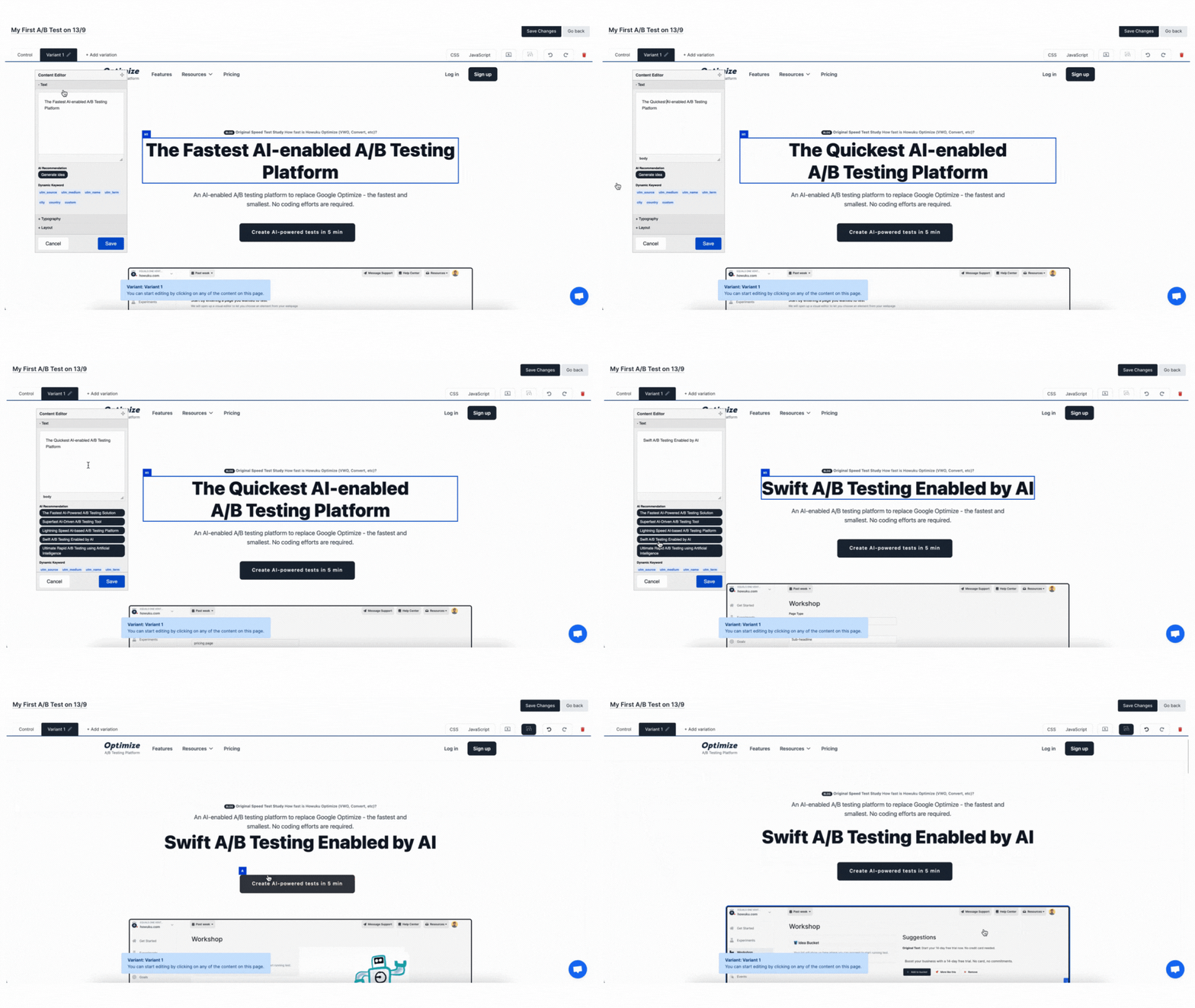
What You Can Build Without Code

Change Text and Headlines

Click any headline, CTA, or body copy and edit it directly. Test different value propositions, offers, and messaging without touching HTML.

Swap Images and Backgrounds

Replace hero images, product photos, logos and background images. Upload a new file or paste an image URL to test visual impact.

Update Colors and Styles

Change button colors, text styles, spacing and visibility. Rearrange sections or hide elements that clutter the page without writing CSS.

Add or Remove Elements

Inject trust badges, urgency messages, social proof, comparison tables and CTAs. Hide distracting navigation or form fields to streamline conversion paths.

Code Editor for Advanced Changes

When the visual editor is not enough, use custom JavaScript and CSS for dynamic changes, conditional logic or interactions the point-and-click interface cannot express.

AI Variants with MidaGX

Describe the change you want in plain language and let MidaGX build the variant. Paste a Figma design and turn it into a live test without handoff to engineering.
Visual editor mockup

How a Visual Editor A/B Test Works

Building a test without code is faster than waiting on a developer, but only if the tool can handle your site's structure. Mida's visual editor works on static sites, SPAs, Shopify themes, and page builders.

1

Install the snippet once

A developer adds the Mida script to your site head once. After that, marketers can create tests without engineering help.
2

Open the page in the editor

Enter the URL you want to test. Mida loads the live page so you can point, click, and edit directly on your actual site.
3

Make your changes

Click an element to edit text, swap images, change colors, hide sections or inject new content. Repeat for as many changes as your hypothesis needs.
4

Set a goal and target audience

Choose the metric you want to improve: clicks, signups, purchases, or a GA4 conversion event. Target by URL, device, traffic source or visitor segment.
5

QA on desktop and mobile

Preview the variant before it goes live. Check that changes render correctly on different screen sizes, browsers and breakpoints.
6

Publish and read the results

Split traffic between control and variant. Wait for statistical significance, then read which version drove more conversions, revenue or signups.

Works on Your Platform

Mida's visual editor supports static sites, Shopify themes, WordPress, Webflow, Framer and single-page apps built with React, Vue or Next.js. If your site allows custom HTML in the head, you can run visual editor tests.

  • ShopifyThemes, product pages, cart, checkout (Plus)
  • WebflowMarketing sites and landing pages
  • WordPressPages, posts, WooCommerce stores
  • FramerAll Framer sites and templates
  • React, Vue, Next.jsSingle-page apps and modern frameworks
  • Custom sitesAny site that allows custom HTML

For single-page apps, Mida supports URL-change and DOM-change triggers so tests reapply after client-side navigation. Learn more about A/B testing for SPAs.

Frequently asked questions

Do I need to know code to use the visual editor?

Accordion icon

No. The visual editor is a point-and-click interface for changing headlines, images, CTAs, colors and layouts. Click an element to edit it. For advanced changes that need custom logic, use the code editor or MidaGX AI variants.

What can I change with the visual editor?

Accordion icon

Edit text and headlines, swap images and backgrounds, change button colors and styles, hide or show elements, inject HTML content, rearrange sections, adjust spacing and padding, and update CSS properties. For dynamic behavior or conditional logic, use the code editor.

Does the visual editor work on Shopify, Webflow and WordPress?

Accordion icon

Yes. The visual editor works on Shopify, Shopify Plus, WordPress, WooCommerce, Webflow, Wix, Squarespace, Framer and custom sites. If your platform allows custom HTML in the head section, you can use the visual editor.

Can I use the visual editor on single-page apps?

Accordion icon

Yes. Mida supports React, Vue, Next.js, Nuxt and other SPAs. Use URL-change, DOM-change or element-appears triggers so the test reapplies after client-side navigation. For SPA tests, configure wait-for-element or specific DOM change conditions.

What if the visual editor cannot make the change I need?

Accordion icon

Use the code editor to write custom JavaScript and CSS. For complex changes, use MidaGX AI to describe the change in plain language or paste a Figma design. MidaGX generates targeting code that works on your site structure.

Can I preview changes before the test goes live?

Accordion icon

Yes. Use the preview URL to see the variant on desktop, mobile and tablet before publishing. Check that changes render correctly across browsers and screen sizes. Share the preview link with teammates for QA.

How does the visual editor apply changes to my site?

Accordion icon

The visual editor generates JavaScript that finds the target element and applies the change when the page loads. Mida loads the script before the page renders so visitors see the variant, not the original content flickering into the variant.

Can I combine visual editor changes with code editor changes?

Accordion icon

Yes. Use the visual editor for simple copy, image and style edits, then add custom JavaScript or CSS in the code editor for dynamic behavior, conditional logic or advanced interactions the visual interface cannot express.

Does the visual editor support multivariate testing?

Accordion icon

Yes. Create multiple variants with different combinations of changes. Mida splits traffic between all variants and the control, then reports which combination performed best. Multivariate tests require more traffic to reach statistical significance.